You’ve probably spent countless hours perfecting your on-page SEO. You’ve optimized your titles, nailed your meta descriptions, and crafted killer content.
But are you still struggling to climb the SERPs?
There’s a good chance you’re overlooking one of the most powerful, yet often misunderstood, elements of modern SEO: contextual linking.
I get it. Link building can feel like a monster of a task. But what if I told you there’s a type of link that you have almost complete control over, that directly boosts your authority, improves user experience, and tells Google exactly what your content is about?
That’s the magic of contextual linking. It’s not just about dropping links randomly into your content. It’s a strategic art that, when mastered, can skyrocket your rankings. And today, I’m going to break it all down for you. We’ll go from the basics to advanced SEO strategies, complete with data and examples, so you can start using contextual links to dominate your niche.
What is Contextual Linking?
Let’s start from the top. What exactly is a contextual link?
A contextual link is a clickable hyperlink placed within the body of your content that directs users to another relevant page.
Simple, right? The key word here is contextual. These aren’t links you find in a footer, a sidebar, or an author bio. They are woven directly into the narrative of your article, blog post, or web page. The text that is hyperlinked is called “anchor text.”

For example, if I’m writing an article about keyword research and I mention a specific technique, I might link to another one of my articles that explains that technique in detail.
Here’s a sentence with a contextual link:
“Once you’ve identified your primary keywords, you should focus on finding long-tail variations, as they often have lower competition and higher conversion rates.”
In this example, “long-tail variations” is the anchor text, and it links to a page that dives deeper into that specific topic. The link is relevant, helpful, and appears naturally within the flow of the sentence.
There are two main types of contextual links:
- Internal Links: These are links that point to another page on the same website. They are crucial for site architecture, distributing “link equity” (more on that later), and guiding users through your sales funnel.
- External Links (or Outbound Links): These are links that point to a page on a different website. Linking out to authoritative, relevant sources can build trust with your audience and signal to search engines that your content is well-researched.
Both types are vital. Neglecting either is like trying to drive a car with only three wheels. You might move, but you won’t get very far, and it’s going to be a bumpy ride.
Why Contextual Linking is a Game-Changer for SEO
Okay, so we know what contextual links are. But why should you care? Why are they so critical for your SEO success?
Back in the day, search engines relied heavily on keyword density to figure out what a page was about. That led to keyword stuffing and low-quality content. Google got smarter. Today, its algorithm is incredibly sophisticated. It looks at hundreds of signals to rank pages, and contextual links are one of the most important.
Here’s why they pack such a punch.
1. They Establish Thematic Relevance and Authority
Contextual links are like votes of confidence. When you link from one page to another, you’re telling Google, “Hey, this page I’m linking to is important and related to this topic.”
The anchor text you use is a massive clue for search engines. If you consistently link to a page about “cold email outreach” using anchor texts like “cold email templates,” “outreach strategies,” and “writing effective cold emails,” Google’s crawlers quickly understand that the target page is an authority on the topic of cold email.
Think of it like building a web of meaning. Internal contextual links connect your content, creating a topical cluster that demonstrates your expertise on a subject. When Google sees this dense, interconnected web of related content, it views your entire site as a more authoritative resource.
A study by Reboot Online found that the placement and context of a link are significant ranking factors. Links placed editorially within content passed more value than links in footers or sidebars. Context is king.
2. They Pass “Link Equity” and Boost PageRank
PageRank is one of Google’s foundational algorithms. While it has evolved, the core concept remains: links pass authority, or “link equity,” from one page to another.
Your homepage, for example, usually has the most authority because it receives the most backlinks from other websites. Through internal contextual linking, you can strategically distribute that authority to other important pages on your site, like your product pages or key blog posts.
This is why a solid internal linking structure is not just a suggestion—it’s a necessity. Without it, you might have a few strong pages and a lot of “orphan” pages with no authority, invisible to search engines and users alike.
By linking from your high-authority pages to pages you want to rank, you give them a direct SEO boost. It’s one of the fastest ways to improve the ranking of a new or underperforming piece of content.
3. They Decrease Bounce Rate and Increase Dwell Time
Bounce rate (the percentage of visitors who leave your site after viewing only one page) and dwell time (how long visitors stay on your site) are key user engagement metrics that Google pays attention to.
Think about it from Google’s perspective. If a user clicks on a search result, spends ten seconds on the page, and immediately clicks back to the search results, it signals that the page wasn’t a good answer to their query. But if they click on a result, spend several minutes reading, and then click on an internal link to explore another related topic on the same site, it signals the exact opposite. It tells Google your site is valuable and engaging.
Effective contextual linking keeps users on your site longer. You answer their initial question and then provide them with easy pathways to explore related topics they might not have even known they were interested in. This creates a “rabbit hole” effect that can turn a 30-second visit into a 10-minute session.
A longer dwell time and lower bounce rate are powerful indicators of quality, which can directly lead to higher rankings.
How Contextual Links Enhance the User Experience (UX)
SEO isn’t just about pleasing search engine bots. In fact, the secret to great SEO is to focus on the user first. Google’s primary goal is to provide the best possible experience for its users. If you do that, Google will reward you.
Contextual linking is a perfect example of where SEO and UX overlap.
1. They Provide Deeper Value and Answer Follow-Up Questions
No single piece of content can cover every possible aspect of a broad topic. When you’re writing, you have to make choices about what to include and what to leave out to keep the content focused.
Contextual links solve this problem beautifully. They act as signposts, guiding curious readers to more in-depth information without cluttering up the current article.
Imagine you’re reading a guide on starting a podcast. The guide briefly mentions “podcast monetization.” If the author includes a contextual link on that phrase to a comprehensive article covering sponsorships, affiliate marketing, and selling products, they have massively improved the user experience. The reader gets their immediate question answered and has a clear next step to learn more about a specific sub-topic.
This approach transforms your website from a collection of individual articles into a comprehensive resource library.
2. They Improve Site Navigation and Information Architecture
For a user, navigating a large website can be overwhelming. A top-level navigation menu is essential, but it can’t show every page.
Internal contextual links create a natural, intuitive navigation path through your content. They guide users from general topics (pillar pages) to more specific ones (cluster content) in a way that makes sense. A user might land on a broad guide to digital marketing, click a link to learn more about SEO, then another link to dive into local SEO, and finally a link to a case study on a local business.
This journey is seamless and driven by the user’s own curiosity. It’s far more effective than forcing them to use a search bar or click through complex menu hierarchies. A well-linked site feels organized, professional, and easy to explore.
Best Practices for Implementing Contextual Links (The How-To)
Ready to start linking like a pro? Remember, it’s not just about the number of links you create—success lies in focusing on quality and having a clear strategy. Thoughtful linking can enhance your content’s credibility and deliver real value. Here are the essential best practices to follow for smarter, more impactful linking.
1. Prioritize Relevance Above All Else
This is the golden rule. A link should only exist if it adds value to the reader and is directly relevant to the context. Don’t force a link where it doesn’t belong just for the sake of SEO.
Ask yourself:
- Does this link help clarify a point?
- Does it provide more in-depth information on a term I just used?
- If a user clicks this, will they feel like it was a helpful next step?
If the answer is no, don’t add the link. A single, highly relevant link is worth more than ten irrelevant ones. Irrelevant links can confuse users and even get you penalized by Google for manipulative practices.
2. Use Keyword-Rich, Natural-Sounding Anchor Text
Anchor text is the clickable text itself. It’s a critical signal for both users and search engines. Vague anchor text like “click here” or “read more” is a massive missed opportunity.
Your anchor text should:
- Be descriptive: It should accurately describe what the linked page is about.
- Be concise: Keep it to a few words or a short phrase.
- Sound natural: It should fit seamlessly into the sentence.
Let’s compare:
- Bad: To learn more about email marketing, click here.
- Good: Building an email list is a crucial first step in any successful email marketing strategy.
The second example tells Google that the linked page is about “email marketing strategy” and sets clear expectations for the user.
Vary your anchor text as well. If you link to the same page ten times from different articles, don’t use the exact same anchor text every time. Use synonyms and variations. For example, for a page on content promotion, you could use anchors like:
- “content promotion techniques”
- “promoting your blog content”
- “how to amplify your content”
- “a guide to content distribution”
This looks more natural to Google and helps the target page rank for a wider range of related keywords.
3. Link Deep, Not Just to Your Homepage
A common mistake is to only link internally to the homepage or main contact page. While those links have their place, the real power of contextual linking comes from “deep linking”—linking to specific blog posts, product pages, or resources deep within your site’s structure.
Deep linking does two things:
- It passes authority to pages other than your homepage, helping them rank on their own.
- It takes the user directly to the most relevant information, which is a much better user experience.
Conduct an internal linking audit. Find your most authoritative pages (the ones with the most external backlinks) and make sure they are linking out to your important “money” pages or new content you want to rank.
4. Maintain a Healthy Ratio of Internal to External Links
Your site shouldn’t be a closed loop. Linking out to high-authority, non-competing websites is a sign of a quality resource. It shows that you’ve done your research and you’re committed to providing the best information to your readers, even if it means sending them to another site.
There’s no magic number, but a good rule of thumb is to include 2-5 relevant outbound links in every 1,000 words of content. Link to studies, statistics, reports, or definitive guides from trusted sources like university websites, government agencies, and industry leaders.
This practice, known as creating a “good neighborhood,” builds trust with your audience and can indirectly benefit your SEO.
5. Link from Old Content to New Content (and Vice Versa)
When you publish a new blog post, your job isn’t done. Go back to your older, relevant articles and find opportunities to link to your new post. This immediately gives the new page some internal link equity and helps Google discover and index it faster.
Likewise, make sure your new post links back to relevant older content. This reinforces your topical authority and helps resurface your valuable evergreen content, keeping it fresh in the eyes of Google and your audience. This creates a virtuous cycle of authority distribution across your site.
Common Contextual Linking Mistakes to Avoid
Contextual linking can be incredibly powerful when done right, but it’s also surprisingly easy to get it wrong. Many people underestimate how small errors in execution can undermine the effectiveness of their links. Here are some of the most common mistakes I often come across, from poorly chosen anchor text to irrelevant or forced connections that fail to add value.
Learning to avoid these missteps is key to making your links work seamlessly and support your content effectively.
1. Keyword Stuffing Your Anchor Text
We talked about using keyword-rich anchor text, but there’s a line. Over-optimizing your anchor text by using the exact same keyword phrase over and over again is a huge red flag for Google.
This was a common tactic in the past, but Google’s Penguin algorithm update specifically targeted and penalized sites for this kind of manipulation.
Example of what NOT to do:
“Our company offers the best running shoes in New York. If you’re looking for the best running shoes in New York, look no further. Click to see our selection of the best running shoes in New York.”
This looks spammy and unnatural. Instead, vary your anchors with partial matches, synonyms, and branded terms.
2. Linking to Low-Quality or Irrelevant Pages
Every link you add is an endorsement. If you link out to a spammy, outdated, or factually incorrect website, it reflects poorly on you. It erodes user trust and can even lead to a search engine penalty by association.
Always vet your external links. Is the site reputable? Is the information accurate and up-to-date? Is the page a genuine resource, or is it just a thin content page plastered with ads? Be selective.
The same goes for internal links. Don’t link to a page just because you want it to rank. It must be a relevant and helpful destination for the user in that specific context. if you have time to read more details about internal link, here the internal link blueprint that you can check now.
3. Having Too Many Links on a Page
More is not always better. A page crammed with hundreds of links looks like spam and dilutes the authority passed by each individual link. Imagine PageRank as a pie. The more slices you cut it into, the smaller each slice will be.
There’s no hard limit, but Google’s Matt Cutts once recommended keeping it to a “reasonable number,” suggesting under 100 links per page as a guideline. Focus on quality over quantity. Each link should have a clear purpose.
4. Not Fixing Broken Links
Broken links (links that lead to a 404 “Page Not Found” error) are terrible for both user experience and SEO. For a user, it’s a dead end and a frustrating experience. For search engines, it’s a waste of “crawl budget.” If Google’s bots keep hitting dead ends on your site, they may crawl it less frequently.
Regularly audit your site for broken links—both internal and external—and fix them. You can use tools to automate this process. Redirect the broken link to the most relevant live page or remove it if no suitable replacement exists.
Tools and Resources for Effective Contextual Linking
Manually overseeing and implementing an effective contextual linking strategy can quickly become an overwhelming endeavor. For websites with a substantial number of pages, content pieces, or evolving structures, the sheer volume of links to manage and optimize can be incredibly time-consuming and prone to human error. This complexity is amplified for larger websites, where hundreds or even thousands of interconnected pages demand constant attention to ensure links are relevant, updated, and strategically placed for maximum SEO benefit.
Fortunately, modern SEO offers a suite of fantastic tools designed to assist in this challenging process. These resources can significantly streamline your efforts, helping you identify opportunities, monitor performance, and automate aspects of your internal and external linking, ultimately making the entire strategy more manageable and effective.
1. Google Search Console
This is a free and essential tool. The “Links” report in Google Search Console is a goldmine of information. You can see:
- External links: Which sites link to you the most and what pages they link to.
- Internal links: Your most linked-to pages on your own site.
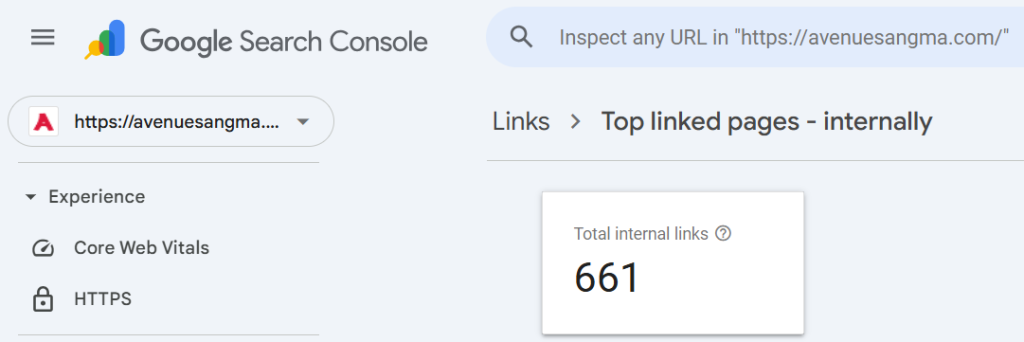
Use this data to identify your most authoritative pages (the ones with the most external links). These are the pages you should be strategically linking from to pass authority to other pages. You can also find pages with very few internal links that might need a boost.
2. Ahrefs
Ahrefs stands out as a powerful, premium SEO suite, and while it requires a subscription, its functionalities for internal linking analysis are truly exceptional. Within Ahrefs, the “Site Audit” tool is particularly adept at pinpointing a comprehensive range of internal linking issues that can hinder your site’s performance.
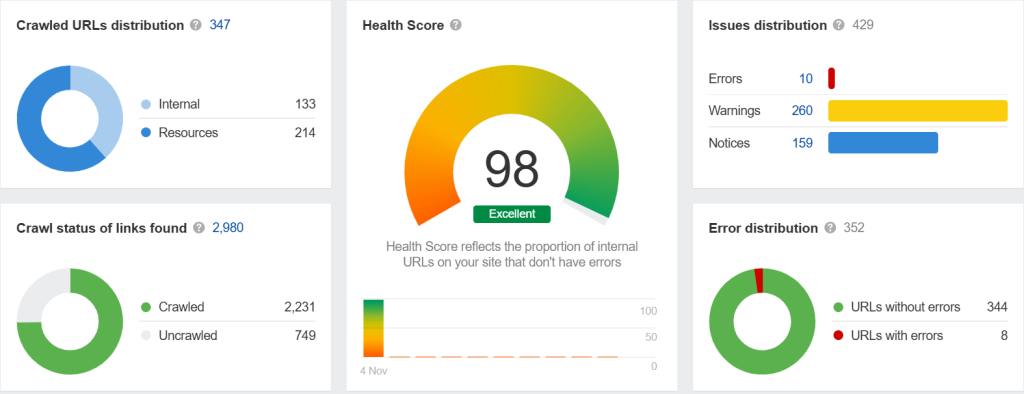
This tool can effectively identify problems such as:
- Broken links
- Orphan pages (pages with no internal links pointing to them)
- Pages that are too many clicks away from the homepage
- Issues with redirects
The “Internal backlinks” report in Site Explorer is also incredibly useful for analyzing the anchor text and context of links pointing to any page on your site.
3. SEMrush
Similar to Ahrefs, SEMrush offers a powerful Site Audit tool that provides a detailed report on your internal linking structure. It visualizes your link distribution and highlights opportunities for improvement.
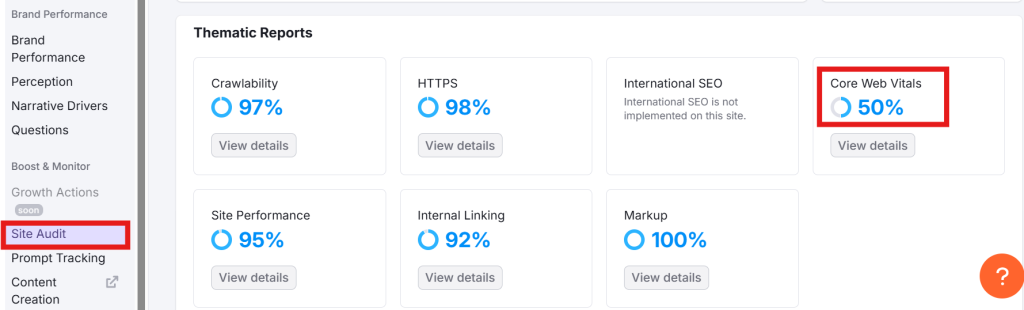
It can also help you find and fix broken links and identify pages that could benefit from more internal link equity.
4. Link Whisper (WordPress Plugin)
If you run your site on WordPress, Link Whisper is a game-changer. It’s a premium plugin that uses AI to suggest relevant internal links as you write your content in the WordPress editor. It can save you hours of work by automatically finding linking opportunities. You can also use its reports to find orphan pages and quickly add internal links to them.
5. Screaming Frog SEO Spider
Screaming Frog is a desktop-based crawler that can spider your entire website just like Googlebot. It’s a technical SEO‘s best friend. You can use it to get a complete picture of your internal linking structure, find broken links, analyze anchor text distribution, and visualize your site architecture. It’s a highly technical tool but provides an unparalleled level of detail.
Conclusion: Start Building Your Web of Context Today
Contextual linking is not a shortcut or a hack. It’s a fundamental component of a sophisticated, long-term SEO strategy that prioritizes user experience.
By weaving a thoughtful web of internal and external links, you’re doing more than just chasing rankings. You are:
- Building authority and demonstrating your expertise to search engines.
- Guiding users on a journey through your content, increasing engagement and dwell time.
- Distributing PageRank strategically to lift up your most important content.
- Providing immense value to your audience by making your site a comprehensive, easy-to-navigate resource.
Stop thinking of your content as a collection of isolated islands. Start thinking of it as an interconnected network.
Your action plan is simple:
- Audit: Use a tool like Google Search Console or Ahrefs to analyze your current internal linking structure. Find your orphan pages and your high-authority pages.
- Strategize: Identify your most important “money” pages. Plan to build links to them from your high-authority posts.
- Implement: The next time you write a new post, be intentional about linking to 3-5 older, relevant articles. Then, go back to those old articles and link to your new one.
- Refine: Make this a part of your regular content process. Always be on the lookout for linking opportunities that improve the user journey.
Master the art of contextual linking, and you’ll not only see your rankings climb but also build a website that your audience trusts and loves.